The starting point for our case study is the design model shown in Figure 18.2 above.
In the following sections, we show how to eliminate the Manager class by
using the Class Hierarchy Merge design pattern and
how to implement the Person hierarchy and use Joined, Multiple Table Inheritance storage with the help of JPA
framework.
We design the model classes of our example app
with the help of a Java data model that we derive
from the design model by essentially leaving the
generalizatiion arrows as they are and just adding getters and setters to each
class. However, in the case of our example app, it is natural to apply the Class Hierarchy Merge design pattern to the
segmentation of Employee for simplifying the data model by eliminating
the Manager subclass. This leads to the model shown in Figure 18.5 below. Notice
that we have also made two technical design decisions:
We have declared the segmentation of
PersonintoEmployeeandAuthorto be complete, that is, any person is an employee or an author (or both).We have turned
Personinto an abstract class (indicated by its name written in italics in the class rectangle), which means that it cannot have direct instances, but only indirect ones via its subclassesEmployeeandAuthor. This technical design decision is compatible with the fact that anyPersonis anEmployeeor anAuthor(or both), and consequently there is no need for any object to instantiatePersondirectly.
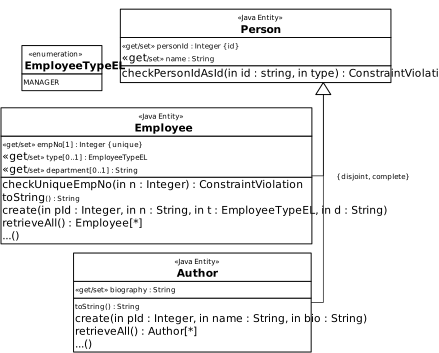
Compared to the model of our first case study, shown in Figure 18.4 above, we
have to define the category relationships between Employee and
Person, as well as between Author and
Person, using the JPA annotation.
In the UI code we have to take care of:
Adding the views (in the folders
WebContent/views/authorsandWebContent/views/employees) and controller classes (AuthorControllerandEmployeeController) for the correspondingAuthorandEmployeemodel classes.Deal with the
Managercase, by adding a "Special type" select control, in the forms of the "Create book" and "Update book" use cases inWebContent/views/books/create.xhtmlandWebContent/views/books/update.xhtml. Segment property form fields (i.e., department in our example) are only displayed, and their validation is performed, when a corresponding employee type has been selected.
The Java data model shown in Figure 18.5 above is encoded by using the JavaBeans
Person, Employee and Author as well as
for the enmueration type EmployeeTypeEL.
We define the category relationships between Employee and
Person, as well as between Author and
Person, using the JPA annotations. At first we create the
Person class as shown below:
@Entity
@Inheritance( strategy = InheritanceType.JOINED)
@DiscriminatorColumn( name = "category", discriminatorType = DiscriminatorType.STRING, length = 16)
@Table( name = "persons")
public abstract class Person {
  @Id
  @PositiveInteger
  @NotNull( message = "A person ID value is required!")
  private Integer personId;
  @Column( nullable = false)
  @NotNull( message = "A name is required!")
  private String name;

  // constructors, set, get and other methods
}
Comparing with the Book hierarchy shown in Test Case 1, the @Inheritance
annotations defines now the strategy = InheritanceType.JOINED. This
means, for every class in the inheritance hierarchy, a database table is used.
The @DiscriminatorColumn( name = "category") specifies the column
in the corresponding table (i.e., persons) of the top hierarchy
class (i.e., Person) which stores the discriminator values used to
identify the stored type of each entry (table row).
Notice that the Java class Person is declared as being
abstract, which means it can't be initialized, instead we can
and we initialize subclasses derived from it (i.e., Employee and
Author). This also mean that we don't declare a
@DiscriminatorValue because no direct instance of
Person is stored in the database table.
Further, we define the Author class as follows:
@Entity
@DiscriminatorValue( value = "AUTHOR")
@Table( name = "authors")
@ManagedBean( name = "author")
@ViewScoped
public class Author extends Person {
  @NotNull( message = "A biography is required!")
  private String biography;

  // constructors, set, get and other methods
}
The Author class inherits Person, therefore the get
and set methods corresponding to personId and name
properties are available. The @DiscriminatorValue( value =
"AUTHOR") specifies that the column category of the
persons table stores the value AUTHOR for every
entry which comes from persisting an Author instance.
Last we define the Employee
class:
@Entity
@DiscriminatorValue( value = "EMPLOYEE")
@Table( name = "employees")
@ManagedBean( name = "employee")
@ViewScoped
public class Employee extends Person {
  @Column( nullable = false)
  @NotNull( message = "An employee ID is required!")
  @Min( value = 20000, message = "Employee no. must be greater than 20000!")
  @Max( value = 99999, message = "Employee no. must be lower than 100000!")
  private Integer empNo;
  @Column( nullable = false, length = 32)
  @Enumerated( EnumType.STRING)
  private EmployeeTypeEL type;
  @Column( nullable = true, length = 64)
  private String department;

  // constructors, set, get and other methods
}
Notice the type property used to identify the
Employee type, such as Manager. Its values are
defined by the EmployeeTypeEL enumeration.
As a result of the @Inheritance( strategy =
InheritanceType.JOINED) annotation, for each class in the inheritance
hierarchy, one database table is created. The corresponding simplified SQL-DDL
scripts used by JPA to create the persons, authors and
employees tables are shown below:
CREATE TABLE IF NOT EXISTS `persons` (
  `PERSONID` int(11) NOT NULL,
  `category` varchar(16) DEFAULT NULL,
  `NAME` varchar(255) NOT NULL
);

CREATE TABLE IF NOT EXISTS `authors` (
  `PERSONID` int(11) NOT NULL,
  `BIOGRAPHY` varchar(255) DEFAULT NULL
);
ADD CONSTRAINT `FK_authors_PERSONID` FOREIGN KEY (`PERSONID`) REFERENCES `persons` (`PERSONID`);

CREATE TABLE IF NOT EXISTS `employees` (
  `PERSONID` int(11) NOT NULL,
  `DEPARTMENT` varchar(64) DEFAULT NULL,
  `EMPNO` int(11) NOT NULL,
  `TYPE` varchar(32) DEFAULT NULL
);
ADD CONSTRAINT `FK_employees_PERSONID` FOREIGN KEY (`PERSONID`) REFERENCES `persons` (`PERSONID`);
As we can see, every table contains the direct properties as defined by the
corresponding JavaBean class. Additionally, the authors and
employees tables are created with a foreign key constraing for
the PERSONID column refering to to the PERSONID
column from the persons table.
The user interface (UI) is very similar with the one for the Book hierarchy shown earlier
in this tutorial. For every JavaBean class, we have a controller class which
contains the add, update and destroy CRUD methods. The PersonController
class is defined as abstract and contains the checkPersonIdAsId method,
which is common to all subclasses. The AuthorController and
EmployeeController inherits the PersonController.
For every non-abstract JavaBean in the inheritance hierarchy we define a set of
views corresponding to CRUD operations. For example, in the case of
Author we have WebContent/views/authors/{listAll, create,
update, destroy}.xhtml files. In the case of Employee, the
List All Employees test case require to
display the Special type of employee
column:
<h:column>
  <f:facet name="header">Special type of employee</f:facet>
  #{e.type != null ? e.type.label.concat( " of ").concat( e.department).concat( " department")  : ""}
</h:column>
It is interesting to notice that within JSF expressions we can' use the + (plus)
operator to concatenate Java strings. JSF EL expression allows the +
operator to be used only with number types. However, we can use the
concat method available to any String object.
The Create, Update and Delete test cases for
both cases, Author and Employee are similar whith what we
have learned in this tutorial as well as in the Part 1 to 5 tutorials.